> For the complete documentation index, see [llms.txt](https://docs.bluerock.io/llms.txt). Markdown versions of documentation pages are available by appending `.md` to page URLs; this page is available as [Markdown](https://docs.bluerock.io/bluerock-dashboard/platform-overview.md).
# Platform Overview
### Introduction
BlueRock Dashboard is a platform for monitoring, analyzing, and governing activity across AI agent applications and their supporting services.
BlueRock Sensors running in the BlueRock host generates obervability events in OTEL format at runtime for AI agentic and MCP application workloads and sends it to BlueRock Dashboard for visibility, security, policy management, cost analysis, and investigation.
The platform provides a centralized view of activity and relationships across agents, MCP servers, LLMs, tools, sessions, and related events.
### BlueRock Capabilities
The BlueRock Dashboard provides the following capabilities:
* **Visibility Charts:** Provides visibility into operational and security activity across the environment.
* **Graph Explorer:** Provides an interactive view of entities and their relationships, allowing users to explore activity and trace related events.
* **Policy Management:** Provides centralized management of security and governance policies, including creation, review, approval, revision, and deployment.
* **Cost Management:** Provides visibility into token usage, estimated spend, and cost-related activity.
* **Alert Rules:** Provides rule-based monitoring that evaluates activity and generates alerts when configured conditions are met.
* **Investigation:** Provides a structured workspace for investigating observed entities and activity.
### Architecture and Data Model
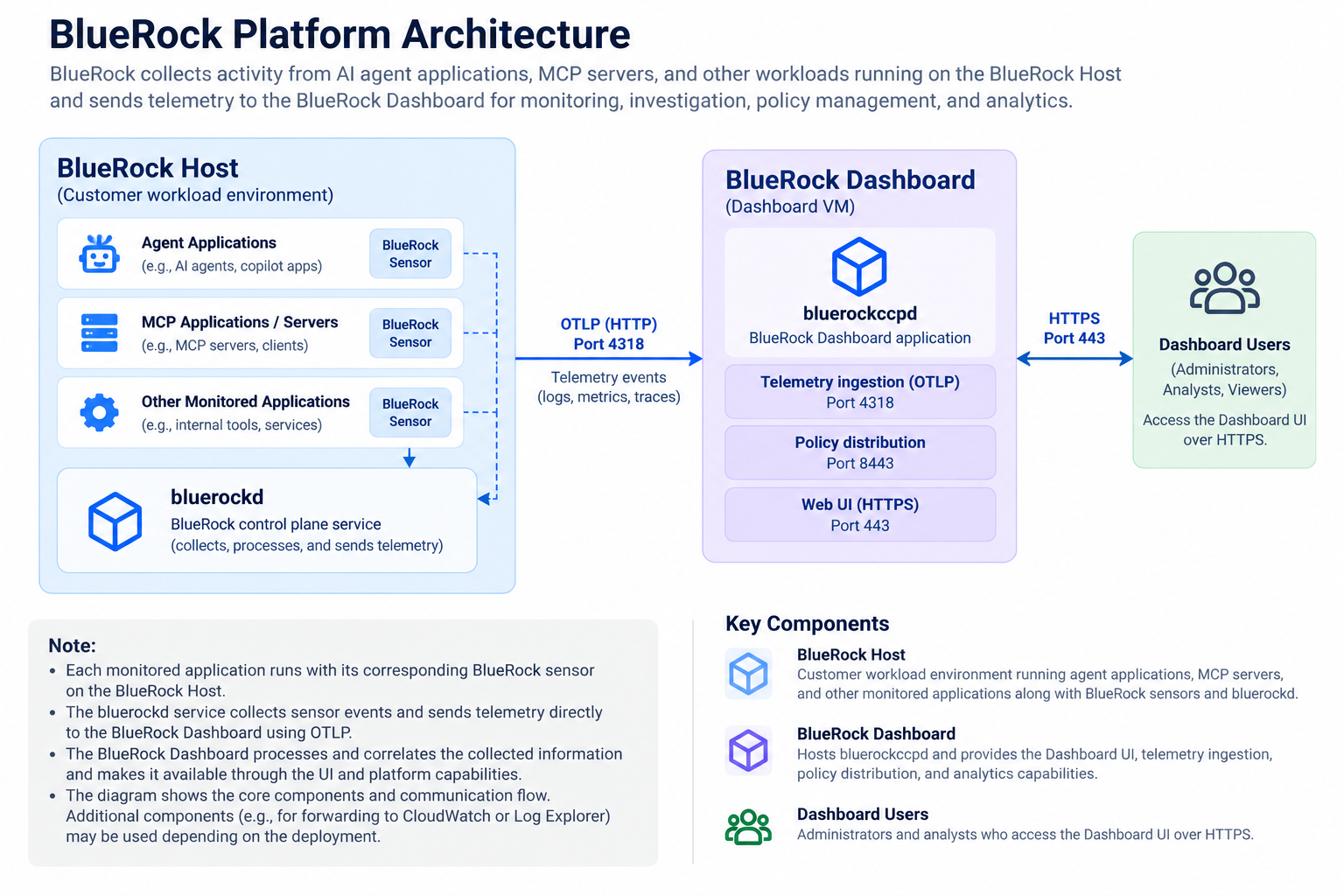
A typical BlueRock deployment consists of one or more **BlueRock Hosts** and a **BlueRock Dashboard**.
The **BlueRock Host** is the customer workload environment where AI agent applications, MCP applications, and their associated BlueRock sensors run.
Each monitored application can have its own BlueRock sensor. The sensors collect activity from the applications and send events to the `bluerockd` service running on the BlueRock Host.
The `bluerockd` service collects the sensor events and sends the resulting telemetry directly to the BlueRock Dashboard using OTLP.
The **BlueRock Dashboard** hosts the `bluerockccpd` application and provides the Dashboard UI and services for processing and presenting the collected activity.
At a high level, activity flows through the platform as follows:
**Customer Workload → BlueRock Sensors → `bluerockd` → OTLP → BlueRock Dashboard**
BlueRock Dashboard represents relationships between entities in the monitored environment. At a high level, these relationships include:
**Host → Agent → LLM / MCP Server → Tool**
Events are associated with these entities and grouped to provide context for activity within a session.
This data model allows users to understand how activity flows through the environment and investigate relationships between agents, LLMs, MCP servers, tools, sessions, and events.
Graph Explorer provides a visual way to explore these relationships and trace related activity.
---
# Agent Instructions
This documentation is published with GitBook. GitBook is the documentation platform designed so that both humans and AI agents can read, navigate, and reason over technical content effectively. Learn more at gitbook.com.
## Querying This Documentation
If you need additional information that is not directly available in this page, you can query the documentation by asking a question.
Perform an HTTP GET request on the following URL with the `ask` and `goal` query parameters:
```
GET https://docs.bluerock.io/bluerock-dashboard/platform-overview.md?ask=&goal=
```
`ask` is the immediate question: it should be specific, self-contained, and written in natural language.
`goal` is what the user is ultimately trying to achieve, the reason they need the answer. Sharing it helps GitBook give you a better, more relevant answer. A goal is most helpful when it describes the outcome the user wants rather than restating the question. For example, with `ask=how do I create an API token`, a goal like `automate deployments from our CI pipeline` lets GitBook tailor the answer to that use case.
The response will contain a direct answer to the question and relevant excerpts and sources from the documentation.
Use this mechanism when the answer is not explicitly present in the current page, you need clarification or additional context, or you want to retrieve related documentation sections.